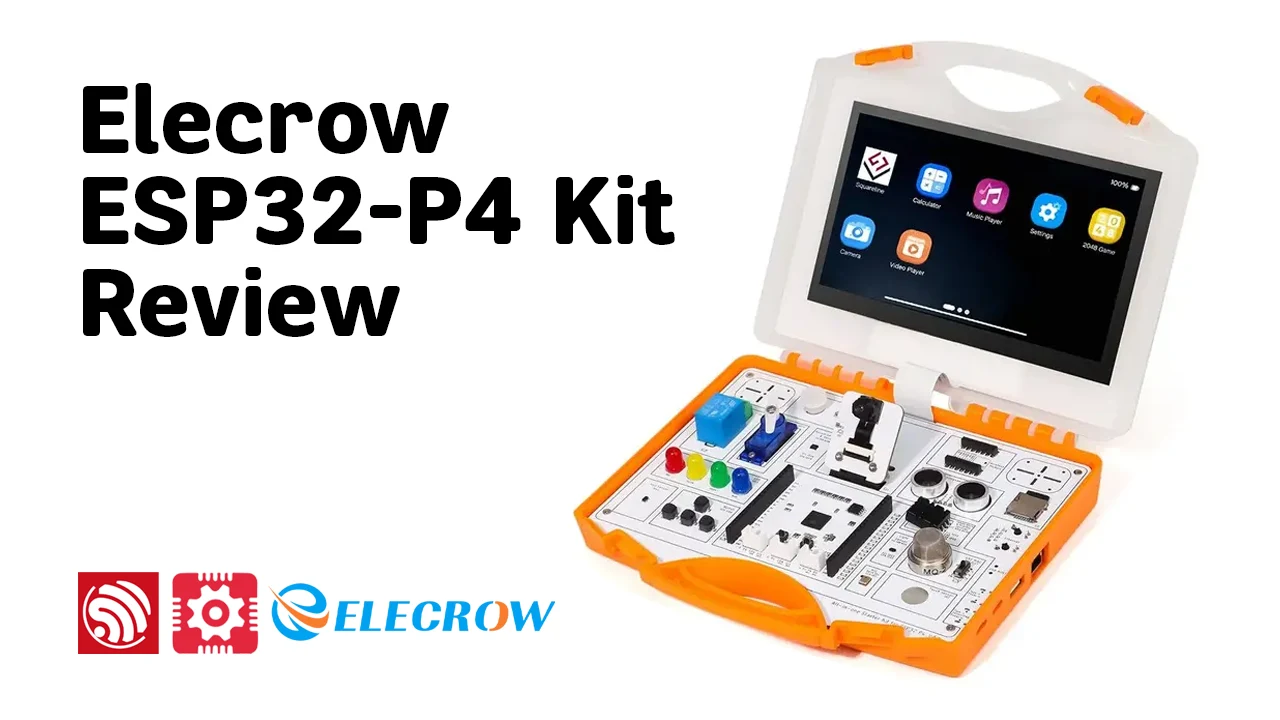
Looking for ESP32-P4 Starter Kit for AI or Prototyping? The landscape of microcontroller development is shifting rapidly toward high-performance computing, advanced Human-Machine Interfaces (HMI), and Edge AI capabilities. The Elecrow All-in-One Starter Kit for ESP32-P4 emerges as a groundbreaking solution that bridges the gap between beginner-friendly maker projects and professional-grade industrial prototyping.
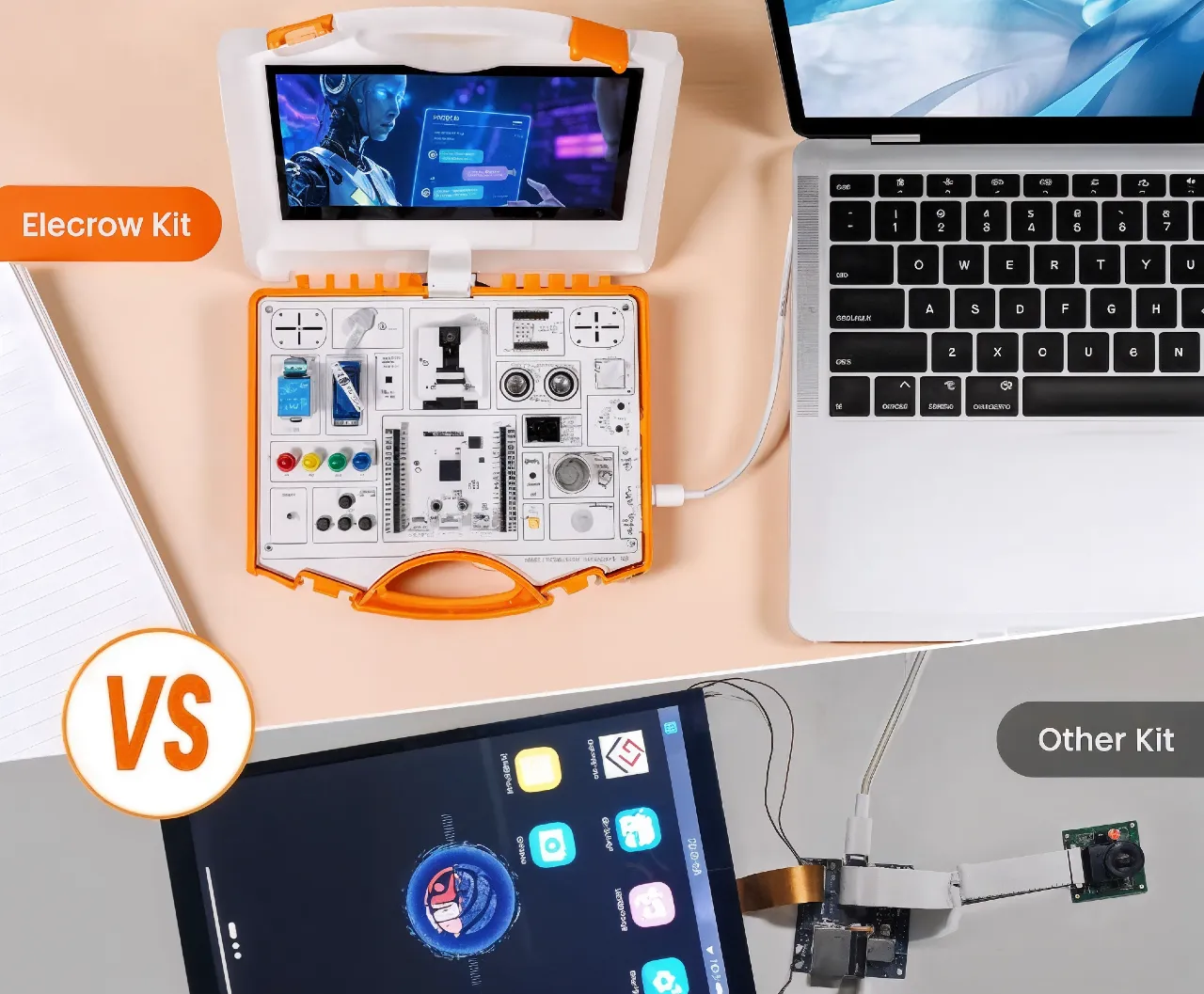
At its core is Espressif’s ESP32-P4 , a powerful dual-core RISC-V SoC (high-performance core up to 360–400 MHz + low-power core) with built-in AI extensions, ample memory (16MB Flash + PSRAM support), and versatile connectivity options. Unlike traditional ESP32 kits that demand extensive breadboarding, wiring, and soldering, Elecrow’s innovative “Common Board” design integrates 16 modular sensor/peripheral modules directly onto a single, ready-to-use board. This eliminates setup hassles and lets users focus on learning and creating.
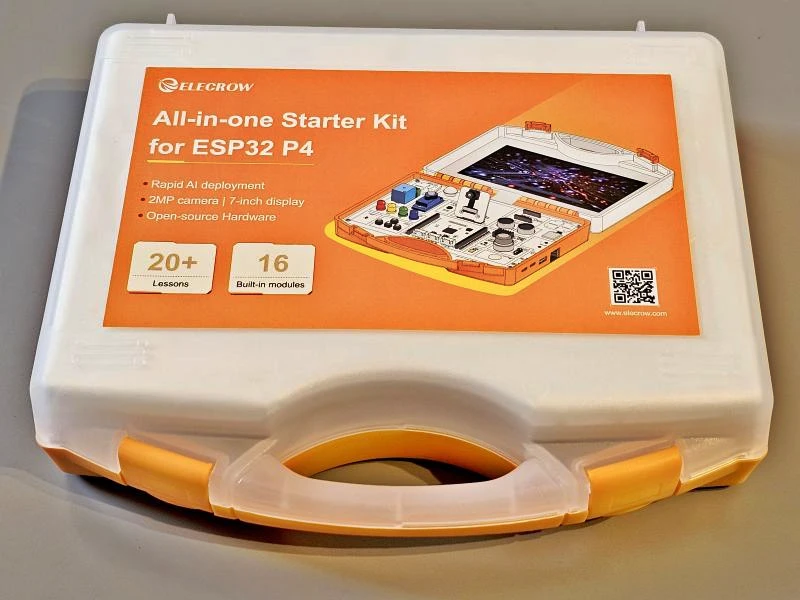
Paired with a vibrant 7-inch touchscreen for intuitive visual interaction, a 2MP wide-angle camera for computer vision experiments, and structured step-by-step lessons (over 20 AI-focused projects), the kit empowers exploration of real-world applications like voice recognition, image processing, IoT control, multimedia handling, and smart edge devices. Packaged in a portable suitcase-style format, it’s perfectly suited for educators building interactive curricula, students diving into embedded systems and AI, makers prototyping quickly, and engineers testing complex logic without the usual friction.
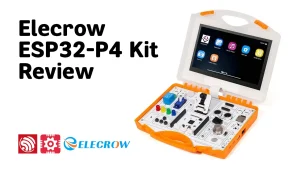
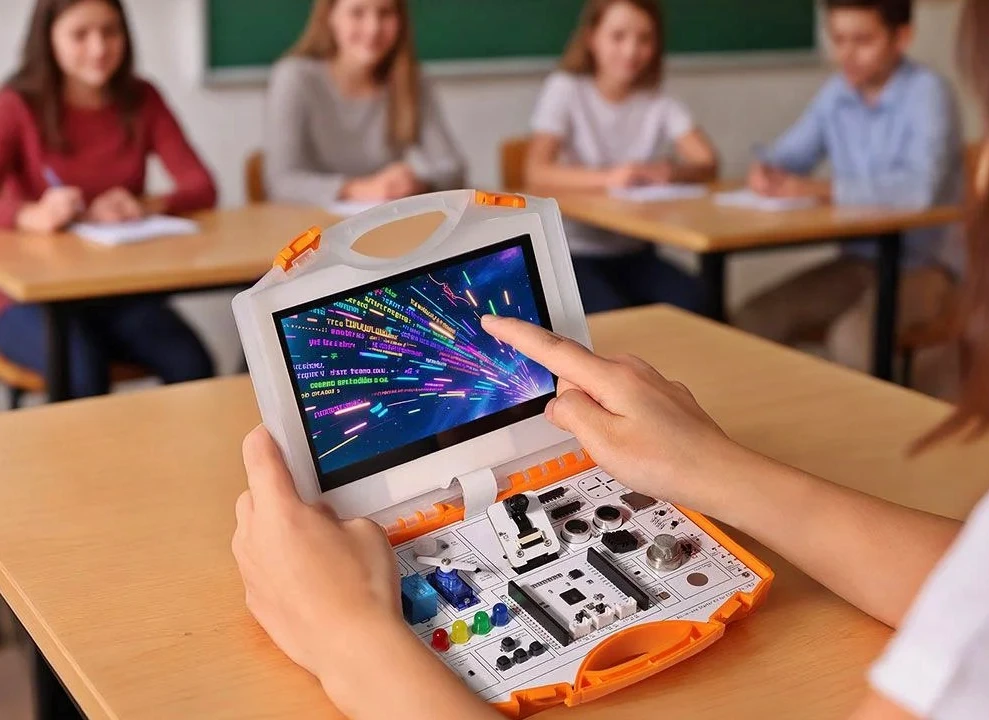
Here are some real-world views of the Elecrow All-in-One Starter Kit for ESP32-P4, showcasing its integrated common board, large touchscreen, and modular setup. So, If you’re new to microcontrollers or an experienced developer seeking an efficient platform for Edge AI and HMI projects, this open-source-friendly kit from Elecrow delivers accessibility, structure, and serious performance , making advanced ESP32-P4 experimentation fun, fast, and frustration-free.
Features and Capabilities
The Elecrow All-in-One Starter Kit for ESP32-P4 delivers a highly integrated, powerful platform that redefines what’s possible in beginner-to-advanced embedded development, Edge AI, and HMI projects.
At its core is the ESP32-P4NRW32 wireless MCU , a true high-performance beast featuring a dual-core RISC-V processor running up to 400 MHz with AI instruction extensions and a single-precision floating-point unit (FPU), complemented by a low-power single-core MCU at 40 MHz for efficient background tasks. Memory is generous and well-optimized for demanding workloads: 768 KB high-performance L2 cache, 32 KB low-power SRAM, 8 KB TCM, plus 32 MB PSRAM , ensuring smooth execution of image processing, voice algorithms, and other compute-intensive AI applications.
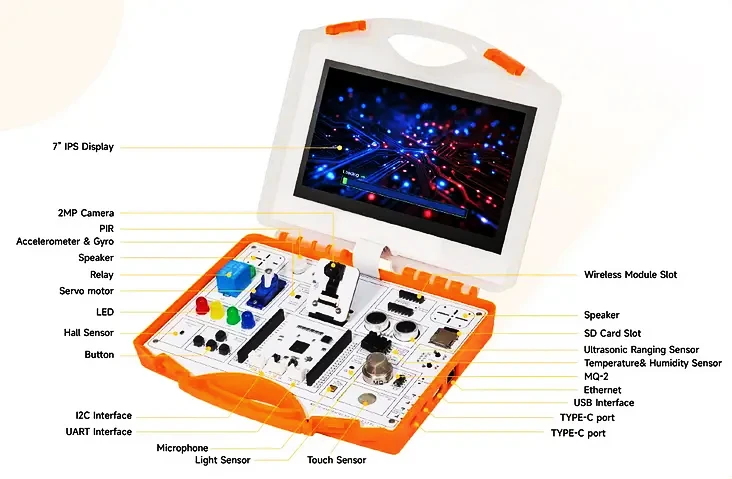
The standout common board design eliminates messy breadboards and endless wiring by seamlessly integrating 16 plug-and-play modules , including environmental sensors (DHT22 temperature/humidity, MQ-2 gas, light, PIR motion, ultrasonic ranging), motion sensing (accelerometer + gyroscope), Hall effect, touch inputs, relay, servo motor, user buttons, and LEDs. All modules share a standardized form factor with uniform mounting holes for a clean, “building block” experience that keeps projects organized and structurally sound.
Visual interaction takes center stage with a 7-inch IPS capacitive touchscreen (1024×600 resolution) driven via MIPI-DSI for smooth, responsive GUIs using libraries like LVGL 8.3.3 , ideal for dashboards, smart control panels, and interactive AI interfaces. Multimedia features round out the package: a 2MP wide-angle camera (100° lens via MIPI CSI), onboard microphone array for voice capture, dual-channel speakers for audio output, plus support for H.264 encoding and a dedicated Pixel Processing Accelerator (PPA) , perfect for computer vision, face detection, object recognition, gesture control, and speech projects like Voice controlled home automation by Arduino & Elechouse V3.
Connectivity and expansion are equally robust: dual USB ports (Type-C for power/data, Type-A for peripherals), MicroSD slot, Ethernet for wired networking, I2C/UART via JST connectors, dual 20-pin GPIO headers with comprehensive pinout mappings, and a slot for optional wireless modules (Wi-Fi/Bluetooth add-ons). This makes the kit exceptionally versatile for local processing, IoT gateways, automation, and beyond.
What truly sets this kit apart is its focus on structured learning , with over 20 AI-focused lessons covering edge inference, basic AI concepts, and ESP32-P4-powered intelligent applications , combined with open-source principles for endless customization.
The portable suitcase-style packaging keeps everything organized and ready for classrooms, workshops, or personal tinkering.
Applications and Use Cases
The Elecrow All-in-One Starter Kit for ESP32-P4 truly unlocks a world of practical, real-world applications by blending powerful hardware with structured educational depth , making it a go-to platform for everything from classroom learning to serious prototyping.
In smart home and automation projects, the kit excels at rapid development of interactive systems, such as building a DIY Smart Chatbot Lamp with ESP32 ChatGPT Voice Assistant. Leverage the integrated MQ-2 gas sensor for air quality monitoring, PIR motion detection for security triggers, or the onboard microphone paired with AI speech recognition lessons to enable voice-controlled appliances via the relay and servo. Build polished smart home control panels using LVGL to create intuitive dashboards on the 7-inch touchscreen , controlling lights, thermostats, or even security feeds with smooth, responsive GUIs.
For educational and STEM environments, the kit’s 19–20 step-by-step courses provide a clear progression from basic sensor interfacing to advanced topics like computer vision and edge inference. Teachers and students can easily create projects such as a touchscreen weather station combining DHT22 (temperature/humidity) and light sensors, interactive dashboards, or simple AI-driven experiments , turning abstract concepts into hands-on learning without wiring headaches.
In edge AI, IoT, and rapid prototyping, the ESP32-P4’s high-performance RISC-V cores, AI extensions, camera, and PPA accelerator enable sophisticated tasks like object detection, gesture recognition, motion tracking via gyroscope/accelerometer, or environmental monitoring with ultrasonic data fused with camera feeds. Makers and engineers can prototype wearables, robotics (using the servo for actuation), or industrial mockups with stable Ethernet connectivity , all while skipping custom PCB design in early stages.
Elecrow ESP32-P4 kit Technical Specifications
| Category | Specification |
|---|---|
| Microcontroller / SoC | Espressif ESP32-P4NRW32 • High-performance dual-core RISC-V @ up to 400 MHz (with AI extensions & single-precision FPU) • Low-power single-core RISC-V @ 40 MHz |
| Memory | 768 KB high-performance L2 memory 32 KB low-power SRAM 8 KB TCM 32 MB PSRAM 128 KB HP ROM, 16 KB LP ROM |
| Storage | 16 MB NOR Flash MicroSD card slot (SDIO 3.0 / TF card support) |
| Display | 7-inch IPS capacitive touchscreen Resolution: 1024 × 600 Interface: MIPI-DSI |
| Camera | 2 MP wide-angle camera (100° FOV) Interface: MIPI-CSI (supports up to 5 MP cameras) |
| Audio | Onboard microphone (dual digital microphone array) Dual-channel speakers |
| Networking / Connectivity | 100 Mbps Ethernet RJ45 (with PoE support) Slot for optional wireless module (Wi-Fi/Bluetooth add-on) Note: No native Wi-Fi/Bluetooth on ESP32-P4 |
| Integrated Modules | 16 plug-and-play Crowtail-compatible modules: • Sensors: PIR motion, accelerometer & gyroscope, ultrasonic ranging, DHT22 (temperature & humidity), MQ-2 gas, Hall effect, light, touch • Actuators & I/O: relay, servo motor, user buttons, LEDs |
| Interfaces | 2 × USB Type-C (power & data) 1 × USB Type-A UART / I²C via JST connectors 2 × 20-pin GPIO headers (I²C, UART, SPI, 5V, 3.3V, GND) Ethernet RJ45 CSI camera interface MicroSD / TF card slot |
| Power Supply | 5V DC via USB Type-C (or external power input) |
| Dimensions & Weight | 195 × 170 × 46 mm ~600 g (PP plastic enclosure) |
| Other Features | Portable suitcase-style design Reset button I/O status LED Common board modular architecture (no breadboard/wiring needed) |
| AI & Development Support | Built-in AI instruction extensions AI learning examples, demos & 19–20 step-by-step lessons Programming: C/C++, Python (via supported frameworks) |
| Target Users | Students, educators, makers, developers, STEM classrooms, rapid prototyping & edge AI experimentation |
Included Accessories & Packaging
Everything arrives neatly organized in a durable, portable PP plastic suitcase , perfect for classrooms, workshops, or travel. The kit includes:
- Main development board with common board design (integrating all 16 modules directly , no breadboards or soldering required)
- 7-inch IPS capacitive touchscreen assembly (1024×600 resolution)
- 2 MP wide-angle camera module
- Type-C USB cable for power and programming
- All onboard components (speakers, microphone array, etc.)
Here are some unpacked views of the full kit in its portable suitcase, showing the organized layout, touchscreen, camera, and modular board:
For expansion, the kit offers:
- A dedicated slot for optional wireless modules (e.g., ESP32-C3/S3 for Wi-Fi/Bluetooth add-ons, since the ESP32-P4 lacks native wireless)
- JST connectors and dual 20-pin GPIO headers for easy connection of external sensors, actuators, or custom peripherals
16 Plug-and-Play Modules (Crowtail-Compatible)
The standout “Common Board” architecture makes setup effortless , modules share standardized mounting and plug directly into the board for a clean, chassis-ready build. Typical included modules cover a wide range of inputs, outputs, and sensing:
- Input & Interaction: User buttons, rotary potentiometers, touch sensors
- Environmental Monitoring: DHT22 (temperature & humidity), MQ-2 gas sensor, light sensor
- Motion & Distance: PIR motion, accelerometer & gyroscope, ultrasonic ranging, Hall effect
- Output & Actuation: RGB LEDs, buzzers, vibration motors, relay, servo motor
Programming & Software Ecosystem
The kit is developer-friendly with multiple pathways for beginners and pros alike:
- Arduino IDE , Full board support for quick sketches, simple sensor demos, and rapid prototyping (easy library installation and port setup)
- ESP-IDF (Espressif IoT Development Framework) , Professional-grade option in Visual Studio Code (with ESP-IDF & Python extensions) to unlock the full RISC-V performance, AI extensions, and low-level control
- SquareLine Studio + LVGL , Drag-and-drop GUI design tool optimized for the 7-inch touchscreen; create stunning, responsive interfaces (e.g., smart dashboards, control panels) and export code directly to the board
Elecrow’s GitHub repository serves as the central hub with open-source goodies: factory firmware, full source code, example projects (sensor integration, LVGL demos, AI inference), schematics, PCB files, libraries, and over 20 structured tutorials (including videos and PDFs). These cover basics like I/O handling up to advanced topics such as voice processing, image recognition, and edge AI workflows.
🔗 Download ESP32-P4 All-in-one Starter Kit User Manual
Important Notes and Considerations
While this Elecrow All-in-One Starter Kit for ESP32-P4 offers excellent integration and value, there are several important factors to keep in mind before purchasing:
- Wi-Fi & Bluetooth Limitation The ESP32-P4 itself does not include built-in Wi-Fi or Bluetooth radios, as it prioritizes high-performance processing and multimedia capabilities. This kit typically adds a companion wireless module (such as an ESP32-C3), but it’s recommended to verify the exact implementation if your project depends heavily on wireless connectivity. For reliable wireless performance, an optional module may be required.
- Power Requirements Driving a 7-inch IPS touchscreen alongside a 400 MHz dual-core processor results in higher power consumption than standard ESP32 kits. For stable operation , especially during AI tasks, camera usage, or GUI-intensive projects , use a high-quality USB-C cable and a 5V/3A power adapter. Insufficient power can cause brownouts or unstable behavior.
- Learning Curve The kit is Arduino-compatible for beginners, but unlocking the full potential of the MIPI-DSI display, advanced graphics (LVGL/SquareLine), and Edge AI features involves a steeper learning curve. Following Elecrow’s GitHub tutorials and wiki is highly recommended for proper ESP-IDF or Arduino setup.
- Wireless vs Wired Focus The kit emphasizes stable wired connectivity through its 100 Mbps Ethernet port. Wireless capabilities are secondary and may require additional modules. This makes it ideal for stationary projects but something to consider for highly mobile applications.
Additional Notes
- The common board design greatly simplifies hardware setup and reduces wiring errors, making it significantly more beginner-friendly than traditional kits.
- The included AI lessons provide an excellent introduction to Edge AI concepts but are not intended for complex production-level models.
- The large 7-inch display is one of the kit’s biggest strengths for HMI projects, though it naturally increases overall power draw.
- The platform is highly expandable , users can easily add external sensors, actuators, or custom modules via GPIO headers and JST connectors.
Elecrow All-in-one ESP32-P4 Starter Kit introduction video
Look at Elecrow's Starter Kit for ESP32-P4, featuring 16 integrated modules, a 7-inch touchscreen, and AI lessons for IoT and prototyping, Good for beginners.
Conclusion
The Elecrow All-in-One Starter Kit for ESP32-P4 represents a significant leap forward in educational and prototyping hardware. It successfully moves beyond traditional “blinking LED” beginner kits into the realm of modern, visual, and intelligent computing by combining the high-performance ESP32-P4 SoC, a vibrant 7-inch touchscreen, 16 integrated plug-and-play modules, and structured AI learning content , all neatly packed into a portable suitcase-style design.
This kit effectively bridges the gap between theory and practice, making it an outstanding choice for students, educators, makers, and engineers alike. Whether you’re exploring embedded systems, building interactive Human-Machine Interfaces, experimenting with Edge AI, voice recognition, or computer vision, or teaching the next generation of smart IoT technologies, it provides everything needed to turn ideas into functional, impressive projects with minimal friction.
By delivering exceptional integration, open-source support, and real-world usability, the Elecrow ESP32-P4 All-in-One Starter Kit stands out as a future-ready platform that redefines what an entry-level development kit can achieve. For anyone ready to prototype smarter, more connected devices, this is one of the most complete and valuable solutions available today.
 Looking for alternative development kits or matching hardware? Check out the latest arrivals at the Siqma store.
User Experience & faq
-
What is the Elecrow ESP32-P4 Starter Kit used for?
The Elecrow ESP32-P4 Starter Kit is designed for learning embedded systems, AI, IoT, and sensor programming in an easier way. Since the sensors are already integrated into one board, beginners can focus on coding and experimenting instead of wiring hardware manually.
-
How do I set up and get started with the Elecrow ESP32-P4 Starter Kit?
Plug in the USB-C cable (5V power). Download the user manual and example code from Elecrow’s GitHub or wiki. For quick start, use Arduino IDE: install required libraries, select the board, and flash examples. For advanced use, go with ESP-IDF in VS Code. Factory firmware is often pre-loaded for immediate testing. Full step-by-step guides and video tutorials are available on Elecrow’s site.
-
Which programming languages and platforms are supported?
The kit supports C/C++, Arduino IDE, ESP-IDF (via VS Code), PlatformIO, and Visual Studio Code. Developers can build projects ranging from simple sensor monitoring to advanced GUI and AI applications.
-
Does the Elecrow kit require soldering or external wiring?
No. That’s one of its main selling points. The sensors are already integrated into the board, so users can start learning immediately without complicated hardware assembly.
-
How do I enable Wi-Fi and Bluetooth on the ESP32-P4 Starter Kit?
The ESP32-P4 is Espressif’s first high-performance MCU designed without native wireless connectivity to maximize its multimedia processing power. To use Wi-Fi or Bluetooth, you must utilize the board’s built-in Ethernet port for a wired connection or plug an optional companion wireless module (such as an ESP32-C6 or ESP32-H2 card) into the reserved expansion slot on the board.
-
Why am I getting compilation errors in the Arduino IDE for the 7-inch screen?
This kit utilizes the advanced ESP32-P4 RISC-V architecture, which requires the latest ESP32 Arduino Core (v3.0 or higher). Standard legacy display libraries will fail because this board routes its 1024×600 screen through a high-speed MIPI-DSI interface rather than traditional SPI. To fix this, you must download the custom hardware abstraction libraries directly from the official Elecrow-RD GitHub repository and drop them into your local libraries folder.
-
How do I implement local Edge AI and Face Recognition on this kit?
The kit includes a 2MP MIPI-CSI camera and leverages the ESP32-P4’s extension instructions for AI vector acceleration. For optimal performance, it is highly recommended to develop these workloads within the ESP-IDF environment using the ESP-DL (Deep Learning) library. This ensures efficient utilization of the 16MB in-package PSRAM to handle the real-time camera frame buffers without running out of heap memory.
-
Can the ESP32-P4 Starter Kit run computer vision projects?
Yes. Thanks to its built-in display and camera support, the board can handle basic computer vision and image-processing tasks. Many users explore face detection, object tracking, and AI camera experiments using this platform.
-
How are the 16 onboard sensors mapped if there are no jumper wires?
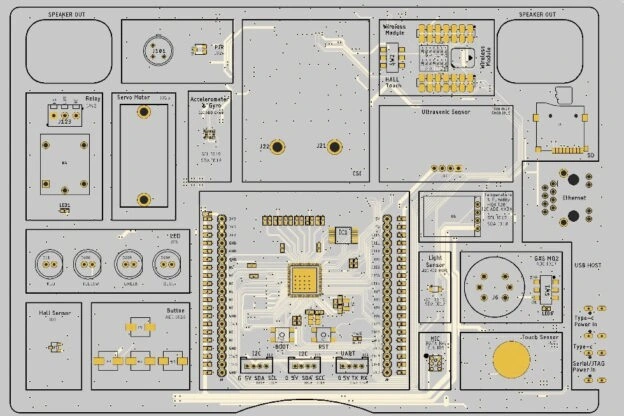
The kit features a “Common Board” layout, meaning all 16 sensors (like the DHT20 temperature sensor, PIR, and MQ2 gas sensor) are permanently trace-routed on the PCB to prevent wiring mess. Some peripherals share pins via an internal I2C bus or an auxiliary co-processor (STC8H) to preserve the main ESP32-P4 GPIOs. You must reference the official Elecrow wiki schematic or the factory_sourcecode pin definition file to call the specific GPIO mappings (e.g., PIR on IO24, Relay on IO42) in your initialization scripts.
-
Does the kit support smooth UI rendering with LVGL?
Yes, exceptionally well. Unlike older ESP32 chips that experience screen tearing at high resolutions, the ESP32-P4 features a dedicated hardware Pixel Processing Accelerator (PPA). The PPA offloads graphic scaling, color space conversion, and blending directly at the hardware layer, allowing you to run complex, smartphone-like LVGL user interfaces on the 7-inch IPS panel smoothly at 360 MHz.
-
What should I do if the kit is not recognized over USB or appears “brick-dead”?
The board features dual Type-C interfaces: one connected to the native USB 2.0 OTG port of the P4, and another routed to a USB-to-UART bridge. For programming, ensure you are connected to the designated UART port. If a faulty sketch soft-bricks the board and breaks the connection, hold down the onboard Reset button, power on the device, and release it to manually force the chip into its ROM Download/Bootloader mode.
-
Why do some users have SD card or firmware flashing issues?
Forum discussions show that SD card initialization errors and flashing problems are usually related to incorrect GPIO configuration, insufficient power supply, or using the wrong USB interface. Updating board settings and checking wiring often solves the issue.
-
Can I expand the kit with external sensors or modules?
So, yes Even though the board already includes many built-in modules, it still provides expansion interfaces such as UART and I2C for connecting extra sensors, motors, or communication devices.
-
Is the Elecrow ESP32-P4 kit good for classroom and STEM education?
Yes. Teachers and educational labs prefer it because students can start experimenting quickly without spending time wiring separate modules. Its organized all-in-one design also makes classroom management easier.
-
Can I use this kit for Meshtastic, Home Assistant, ESPHome, or other projects?
It’s primarily designed for education and custom AI/IoT projects. ESPHome compatibility is emerging for similar Elecrow P4 boards (with some community YAML configs). It’s flexible for custom firmware but shines brightest with the provided lessons rather than ready-made Meshtastic nodes.